


Roost Social
4.8236.00 Reviews
App Specs
- Version
- 1.4.34
- Updated On
- License
- Free
- Downloads
- 100,000+
- Developer
- Good Egg LLC
- Categories
- Social
- Platform
- Android
Screenshots
 Analysis by AppCompare
Roost Social makes a more unusual promise than the typical social feed: it turns a pigeon’s journey into the reason to check in. That gives the app a lighter, slower starting point than a stream built around constant posts and reactions. I can see the appeal if you enjoy small, ongoing digital projects, but the important question is whether the routine stays rewarding after the first burst of curiosity.
The first-week appeal: a small reason to come back
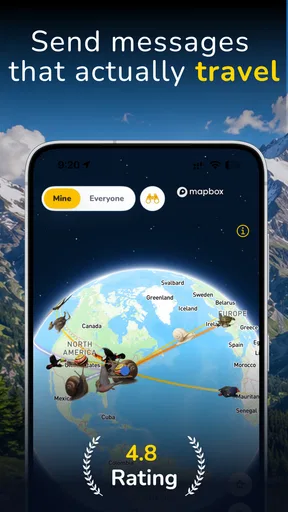
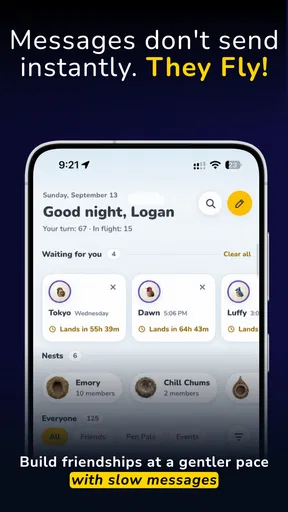
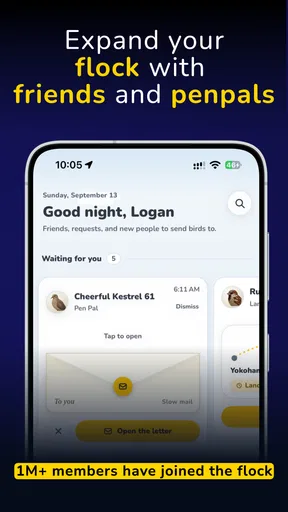
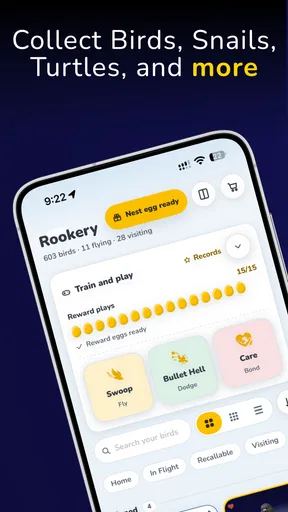
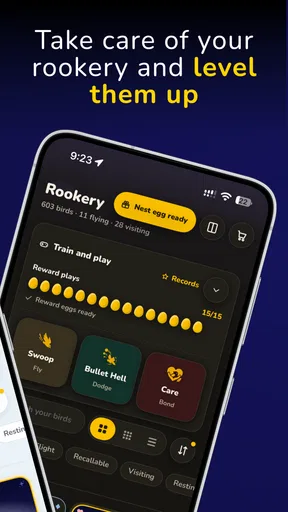
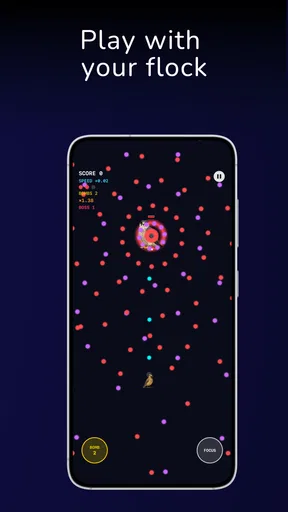
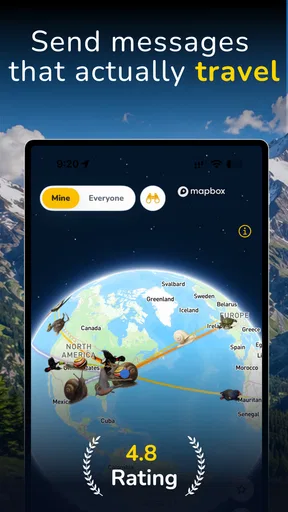
The central idea is easy to grasp: watch a pigeon travel across the globe in real time, collect birds, and train your flock. It is a playful social app from Good Egg LLC, and its hook is less about keeping up with a busy feed than following a living-feeling journey. I’d expect the first few visits to work best as quick check-ins rather than long sessions; the concept invites curiosity, not a marathon.
That difference matters if you are choosing between this and a conventional social network. The usual alternative gives you an endless stream of people’s updates, which can be useful for news and conversation but can also demand attention. Roost Social offers a narrower focus. If you like the idea of having one shared activity to revisit, it may feel calmer; if you want a broad feed full of friends’ photos and active discussions, it is not a substitute.
A realistic way to try it is to open the app during a spare moment—while waiting for a kettle or taking a short break—and see whether the pigeon’s progress gives you a reason to return later. I would avoid turning it into another obligation on day one. Let the trip and flock-building be a pleasant curiosity first, then decide whether you actually miss it when you do not check in.
Why the routine may last beyond novelty
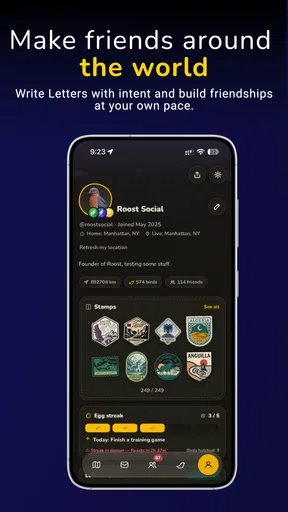
The long-term appeal depends on whether the journey and collecting remain interesting once the basic idea is familiar. The store description points to following travel in real time and developing a flock, which suggests two different kinds of attention: checking the ongoing trip and gradually engaging with the birds. That combination has more potential to sustain a habit than a single novelty alone, though it will suit people who enjoy patient progress rather than immediate, dramatic rewards.
For a small group of friends or family, the app could become a low-pressure shared talking point: one person checks the trip, then mentions it in a chat, without everyone needing to maintain a constant conversation inside the app. That is a useful distinction from social platforms where participation can feel like work. I would treat it as a companion to existing conversations, not a replacement for them or a place to organize important plans.
Roost Social is free to start, with in-app purchases ranging from $0.99 to $19.99 per item. I’d begin without spending and first work out whether the core loop fits your routine. If you later consider a purchase, ask yourself whether it would make the ordinary check-ins more enjoyable or simply speed past the part you like. That is a better test than buying because a new app makes collecting feel urgent.
Worth Reading Before You Choose

Flipboard Shows What News Apps Must Do Beyond the Feed

Switching to Android Auto Means Rethinking Your Driving Routine

Google Calendar Makes a Crowded Week Easier to Manage

Ludo King Makes the Most of the Minutes Between Plans

Baby Panda World Brings Quick Play to Modern Phones, but Its Game Library Feels Busy

ESPN’s Live Game View Makes Following Close Games Easier
Maintenance, fatigue, and practical expectations
The maintenance burden appears modest in concept: the main commitment is remembering to check in and deciding whether you want to spend time collecting and training birds. Still, even a gentle routine can become one more notification competing for attention. I’d keep alerts restrained if the app offers that choice, and make the visit part of a habit you already have—such as checking after lunch—rather than letting it interrupt work or time with other people.
The main risk of fatigue is repetition. A real-time journey can be compelling at first, but a slow-moving activity may feel uneventful on days when you want an immediate payoff. Collecting can also lose its charm if you feel compelled to keep up rather than enjoying the process. If that happens, taking a break is more sensible than treating a casual social app as a streak you must protect.
There is also a practical trade-off in choosing a focused app over a familiar social network: its narrower premise is its strength, but it naturally gives you less reason to open it for general communication. I would not install it expecting a full replacement for your usual social tools. It is better suited to someone who enjoys a playful, ongoing theme and is happy for the app to occupy a small corner of their phone.
Getting Started with Roost Social
First things first, downloading Roost Social is a breeze. Available on both Android and iOS, you can grab it from your respective app store. Once installed, the app greets you with a clean, intuitive interface. Setting up is as straightforward as it gets; just link your social media accounts, and you’re good to go.
Interface & Usability
Let’s talk about the interface. It’s modern, sleek, and doesn’t bombard you with unnecessary features. The design team definitely deserves a high five for keeping things simple and user-friendly. Navigating through the app is smooth, and everything is just a tap away. For someone like me who loves minimalistic designs, Roost Social is a winner.
The dashboard is where all the magic happens. You can view your posts, schedule new ones, and even track engagement metrics. It’s like having a personal social media assistant in your pocket. There’s no clutter, just pure functionality.
Features That Stand Out
Now, let’s dive into the features that make Roost Social worth your time.
- Multi-Platform Posting: Manage and post on multiple social media platforms from one app. No more switching apps every few minutes!
- Scheduling: Plan your posts ahead of time and let the app do the rest. Perfect for maintaining a consistent social media presence.
- Analytics: Get insights into how your posts are performing. Track likes, comments, and shares effortlessly.
- Engagement Tools: Respond to comments and messages from within the app. Stay connected with your audience without the hassle.
How Does It Perform?
Performance-wise, Roost Social holds up pretty well. The app runs smoothly without any noticeable lag, even when managing multiple accounts. The developers have done a commendable job optimizing it for both Android and iOS platforms.
The scheduling feature works like a charm. I set up a week’s worth of content in one go, and the app handled it without breaking a sweat. Notifications are timely, ensuring you never miss an engagement opportunity.
Room for Improvement
While Roost Social is impressive, there are a couple of areas where it could improve. The analytics section, although functional, could benefit from more detailed insights. For those of us who love data, having deeper analytics would be a huge plus.
Another feature I’d love to see is integration with more niche social media platforms. While it covers the big players, adding support for others could make it even more versatile.
The Final Verdict
All in all, Roost Social is a fantastic tool for anyone looking to streamline their social media management. It’s intuitive, efficient, and packs just the right amount of features to keep your online presence thriving. Whether you’re a casual user or a social media manager, this app has something for everyone.
If you’re tired of the constant app switching and want a more organized approach to your social media life, give Roost Social a try. It might just be the solution you’ve been searching for. Happy posting!
Who is most likely to enjoy it?
I’d put Roost Social on the shortlist for people who like collecting, gentle progression, and a shared subject they can check without needing to compose a post every time. It may suit someone who already spends a little time on social apps but wants an activity with a clearer focus than scrolling. The pigeon’s trip gives those visits a theme, while collecting and training provide a reason to make the experience feel personal.
It is less suitable for someone seeking a busy community, direct messaging as the main attraction, or a practical tool for coordinating a group. If your priority is seeing what friends are doing, a conventional social network will serve that purpose more directly. Likewise, if you prefer games with frequent choices, quick rounds, or obvious milestones, the real-time travel idea may feel too slow. I’d choose it for curiosity and easygoing engagement, not as a replacement for either a full social feed or a more active game.
A useful way to make check-ins feel intentional
One small approach I’d use is to pair the app with a moment that already happens each day, rather than opening it whenever the phone is in hand. A lunch break or the end of a commute can be enough. Check the bird’s progress, spend a moment with your flock, then close the app. This keeps the activity contained and helps answer the question that matters over time: does it make a familiar pause more enjoyable, or does it merely add another stop to a phone routine?
If you are sharing the experience with someone else, agree on what you find fun about it rather than turning progress into a contest. A casual conversation about where the pigeon is headed can make the app feel social without requiring constant coordination. That low-pressure use is where its premise seems strongest. If nobody else in your circle is interested, it can still work as a personal check-in, but its social appeal may be less noticeable.
What to look for before settling into it
Because the appeal rests on an ongoing journey and flock development, I would judge it over several ordinary days, not just the first session. Notice whether you naturally remember it, whether checking feels pleasant, and whether collecting or training gives you a reason to return. Those observations are more useful than asking whether the concept sounds charming in theory. If the app becomes easy to ignore, that is a fair sign it may not earn a lasting place on your home screen.
The practical questions are simple: can you enjoy it without paying, does it fit the amount of attention you want to give a social app, and does its focused format feel like a refreshing change from a feed? It is free to download, though optional purchases are available, so I’d explore the basic experience before considering any spending. The Teen content rating is another useful point for households deciding whether it suits a younger user; I would still look at the app together and decide whether its social element fits your family’s preferences.
How it fits among social apps
Most social apps compete through frequent updates, replies, and personalized feeds. Roost Social’s pigeon-centered idea makes a different trade: less breadth in exchange for a distinctive thread to follow. That can be a welcome break if you are tired of refreshing several feeds, but it will not deliver the same range of conversations or information. I see it as a small side app, not a hub for all your online relationships.
For people who manage public accounts or need detailed reporting, a dedicated publishing and analytics tool is the more sensible choice. The older article’s account-management features describe a very different kind of product than the focused pigeon concept, so I would not rely on those claims when deciding what Roost Social does. Its verified identity is as a social app centered on watching a bird’s long-distance progress and tending a flock. That distinction is worth keeping clear before you install it with a specific workflow in mind.
Does it earn a place after the novelty?
Roost Social has a memorable premise, and that is a real advantage: it gives a casual check-in a subject beyond whatever happens to appear in a feed. Its longer-term value will depend on whether you enjoy the pace and the small ongoing connection to the flock. I would give it a fair trial as a lightweight habit, but I would not force a daily routine if the trip stops holding your attention.
The app is free, carries an average rating of 4.6 from 94 ratings, and has more than 10,000 installs. It is currently version 1.3.8, requires Android 8.0 or later, and is rated Teen. Those details place it as an accessible option for many Android users, while the rating and install count offer useful context rather than a guarantee that the experience will suit everyone. Good Egg LLC is the developer behind it.
My lasting verdict is positive but deliberately measured. I like the idea of a social app that gives you one playful thing to follow instead of asking for a constant stream of attention. If you enjoy collecting and patient progress, try it and see whether the pigeon’s journey becomes a small, welcome part of your day. If you want lively conversation, broad posting tools, or a demanding game loop, you will probably be happier elsewhere. The best reason to keep it is simple: you find yourself checking in because you genuinely want to, not because the app has turned the habit into homework.
Pros
- Intuitive user interface simplifies navigation.
- Real-time analytics enhance engagement strategies.
- Seamless integration with major social platforms.
- Customizable alerts for important notifications.
- Efficient scheduling for posts and stories.
Cons
- Limited features in the free version.
- Occasional lag in loading analytics.
- In-app ads can be distracting.
- Requires stable internet connection.
- No offline mode for content drafting.
FAQs for Roost Social
What is Roost Social, and what are its main features?
Roost Social is a dynamic social networking app designed to connect users through shared interests and activities. It offers features such as group chats, event planning, and interest-based communities. Users can create profiles, join discussions, and participate in events, making it a hub for social engagement and networking.
Is Roost Social available for both Android and iOS devices?
Yes, Roost Social is available for download on both Android and iOS platforms. You can find it on the Google Play Store for Android devices and the Apple App Store for iOS devices, ensuring a seamless experience across different mobile operating systems.
Are there any subscription fees or in-app purchases in Roost Social?
Roost Social is free to download and use. However, it may offer optional in-app purchases or a premium subscription for enhanced features, such as ad-free usage or exclusive content. Users should review the app’s pricing details in the store description before downloading.
How does Roost Social protect user privacy and data?
Roost Social prioritizes user privacy by implementing robust security measures, such as data encryption and secure servers. The app’s privacy policy outlines how user data is collected, stored, and shared. Users can adjust their privacy settings to control who sees their information and interactions.
Can I use Roost Social to organize and promote events?
Absolutely! Roost Social includes features specifically designed for event organization and promotion. Users can create event pages, send invitations, and manage RSVPs directly within the app. This makes it an excellent tool for both personal and professional event planning.


